remote it support

What Is Remote IT Support?

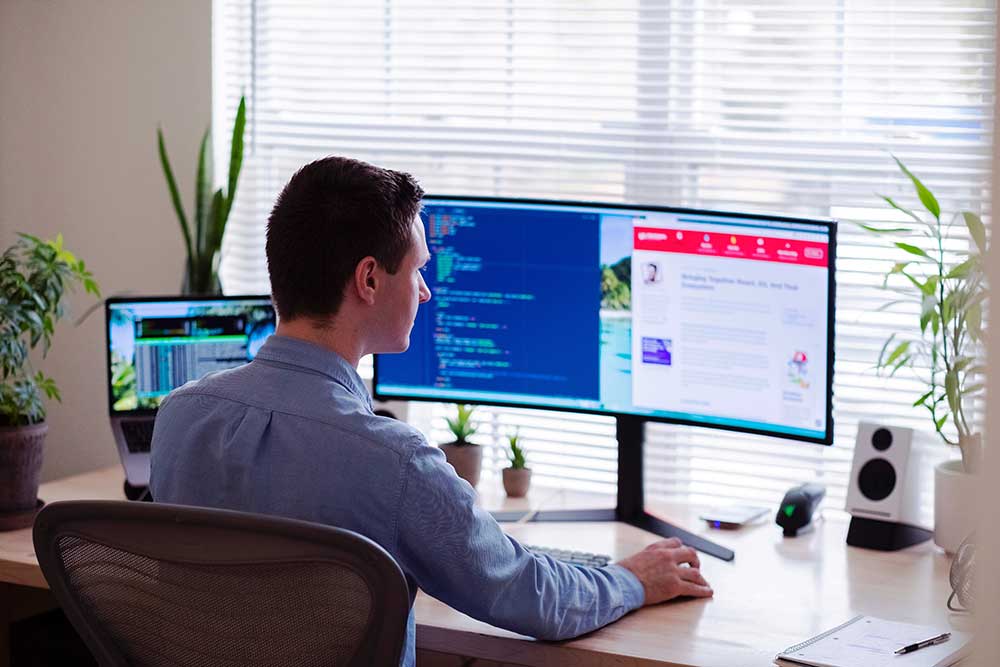
Remote IT support (also called remote tech support or online computer help) is a service where a qualified technician diagnoses and resolves computer, software, or network problems over the internet — without physically visiting your home or office.

Using secure, encrypted remote-access tools, the technician connects directly to your screen, sees exactly what you see, and fixes the issue in real time. You stay in full control throughout: you can watch every single action taken and disconnect instantly at any moment.

For Melbourne businesses and households, this means faster fixes, lower costs, and zero wait times for a technician to travel across the city.

📊 Did you know? Over 80% of common IT issues — virus removal, slow computer fixes, software crashes, email problems, and password resets — can be resolved entirely through a secure remote session without any technician visiting your premises.

How Remote IT Support Works

The process is simple, fast, and completely transparent. Here is exactly what happens when you book a remote IT support session with Computer Cures:

  1. Contact Us: Call 13 0055 3166 or complete our online booking form. Describe the issue and we will give you an estimated fix time immediately.
  2. Download the Secure Access Tool: We send a link to our encrypted remote access software (TeamViewer or AnyDesk). No full installation needed — simply run the file.
  3. Share Your One-Time Session Code: The software generates a unique, single-use code you share with your technician. Once disconnected, all access is permanently revoked.
  4. Technician Diagnoses & Fixes: Our Melbourne-based technician connects, diagnoses, and resolves the issue while you watch. Most sessions complete in 30–60 minutes.
  5. Review the Fix & Session Ends: Your technician explains what was done, makes recommendations, and closes the session. No access remains after disconnection.

What Can Be Fixed Remotely?

Remote IT support is suitable for a wide range of issues. Our Melbourne technicians regularly resolve the following in a single session:

🫖Virus & Malware Removal

Complete virus and spyware removal — we scan, clean, and harden your system remotely.

🐢 Slow Computer & Startup Fixes

Diagnose and resolve slow performance, long boot times, and system freezes.

📧 Email Setup & Problems

Configure Outlook, Gmail, Microsoft 365 — fix sending/receiving issues, set up new accounts.

🔑 Password Resets & Account Recovery

Recover locked accounts, reset Windows passwords, restore access to cloud services.

🪟 Windows & macOS Updates

Fix broken Windows updates, upgrade to Windows 11, or resolve macOS issues.

🖨️ Printer & Peripheral Issues

Set up printers, scanners, and external devices. Fix driver conflicts and connectivity problems.

☁️ Cloud & Software Support

Microsoft 365, Google Workspace, Dropbox, OneDrive setup and troubleshooting.

🛡️ Security & Antivirus Setup

Install and configure antivirus software, firewalls, and multi-factor authentication.

⚠️ When is on-site support needed? Remote support cannot fix hardware — cracked screens, failed hard drives, water damage, or physical cabling require an on-site visit. See our guide: Remote vs On-Site IT Support →

Remote IT Support Costs in Melbourne 2026

One of the most searched questions is: “How much does remote IT support cost in Melbourne?” Pricing varies by provider, issue complexity, and whether you are a home user or business. Here is a clear 2026 breakdown.

Typical Remote IT Support Pricing (Melbourne 2026)

Quick Fix Session
$49–$79
per session (up to 30 min)
  • Password resets
  • Simple software errors
  • Browser / email quick fixes

★ MOST COMMON
Standard Session
$88–$130
per hour
  • Virus & malware removal
  • Speed optimisation
  • Software installation & setup
  • Windows / Mac troubleshooting

Business IT Support
$49–$79
per hour
  • Microsoft 365 support
  • Network configuration
  • Multi-user / server issues

Managed IT Plan
From $149
per user / month
  • Unlimited remote support
  • Proactive monitoring
  • Priority response SLA
  • Best for 5+ staff

✓ Computer Cures Pricing Guarantee: We quote before we start. No surprise invoices. If we cannot fix the issue remotely, you only pay for time diagnosing. See our managed IT pricing and small business IT support costs guide.

What Affects Remote IT Support Pricing?

  • Complexity of the issue — a password reset costs far less than diagnosing a persistent Blue Screen of Death
  • Time taken — most providers bill per hour; simple fixes often take 15–30 minutes
  • Business vs. home user — business environments are more complex and typically carry a slight premium
  • Emergency or after-hours support — expect a 20–50% surcharge for out-of-hours sessions
  • Managed IT vs. ad-hoc — Managed IT plans deliver better value for regular support needs

Remote vs. On-Site IT Support: Which Do You Need?

Understanding the difference helps you choose the right option and avoid paying an unnecessary call-out fee for something fixable in a remote session.

Feature Remote IT Support On-Site IT Support
Response time Under 30 minutes 2–24 hrs + travel
Typical cost $88–$150/hr $120–$200/hr + travel
Software issues ✔ Ideal ✔ Can do
Hardware repairs ✘ Not possible ✔ Required
Network cabling ✘ Not possible ✔ Required
Virus removal ✔ Fully remote ✔ Can do
After-hours ✔ 24/7 available Limited
No call-out fee ✔ Correct ✘ Travel charged
Best for Software, accounts, settings Hardware, cabling, setup

Full guide: Remote vs On-Site IT Support — Which Is Right for You? →

Benefits of Remote IT Support for Melbourne Businesses

For Melbourne small businesses, law firms, healthcare practicesconstruction companies, and other organisations, remote IT support offers significant advantages:

1. Dramatically Faster Response Times

When a staff member cannot access email or a critical system crashes, every minute costs money. Remote IT support connects within 30 minutes — no waiting for a technician to travel across Melbourne. Our team resolves urgent issues for businesses in HawthornCheltenhamMelbourne CBD, and all suburbs.

2. Significant Cost Savings

Remote support eliminates travel time and call-out fees. For cost-conscious businesses this represents savings of 30–50% per support incident compared to on-site visits. Combine with a managed IT services plan for maximum budget predictability.

3. Support for Remote & Hybrid Workers

With hybrid working standard across Melbourne, staff working from Frankston, Box Hill, Dandenong, or from home in regional Victoria all need reliable IT support. Remote access reaches every employee regardless of location.

4. Business Continuity

Our proactive business continuity approach includes remote monitoring — issues are often detected and resolved before they impact your team. See also: Backups & Disaster Recovery.

5. Access to Specialist Skills

Remote access lets you engage Microsoft 365 experts, cybersecurity professionals, and network engineers regardless of their physical location. Computer Cures provides cybersecurity supportMicrosoft 365 management, and cloud backup services remotely for businesses across Melbourne.

🏢 Industry-specific IT support available: Computer Cures delivers tailored remote IT support for healthcare providers, construction companies, legal practices, and small businesses. View all business services →

Remote IT Support for Melbourne Home Users

You do not need to be a business to benefit. Melbourne residents use our remote tech support every day for:

  • Computers running slowly or freezing — fixed with our PC speed-up service
  • Virus and ransomware infections — resolved via remote malware removal
  • Setting up new laptops and transferring files and settings
  • Email problems — Outlook not opening, Gmail sync issues, iCloud errors
  • Internet connection troubleshooting (software-side issues)
  • Facebook account recovery and scam cleanup
  • Tech support for seniors — patient, jargon-free explanations
  • Printer, scanner, and smart device setup

Home users particularly value getting expert help without a stranger coming to their house and without transporting a heavy desktop across Melbourne. We connect, fix, and disconnect — quickly and safely.

Is Remote IT Support Safe? What You Need to Know

Security is the most common concern — and a valid one given the rise of remote access scams in Australia. Here is how to stay safe and what separates a legitimate provider from a scammer.

How Legitimate Remote Support Works

  • You always initiate contact — a real IT company never cold-calls demanding remote access. Unsolicited “Microsoft” or “Telstra” support calls are scams. Hang up immediately.
  • Session-only access via one-time code — once the session ends, all access is permanently revoked.
  • 256-bit encrypted connection — industry-standard tools use bank-level encryption. Nobody can intercept the session.
  • You watch every action in real time — you can see every mouse movement and disconnect instantly at any point.
  • No unattended access — legitimate providers do not request background access permissions unless explicitly authorised.

🚨 Watch out for tech support scams! Scammers impersonate Microsoft, NBN Co, Telstra, and major banks. They create fake warning screens claiming your computer is infected. Read our guide: How to Identify & Avoid Remote Access Scams →

Remote IT Support vs. Managed IT Services

For businesses needing regular IT assistance, a Managed IT Services plan is often more cost-effective than ad-hoc remote sessions.

Factor Ad-Hoc Remote Support Managed IT Plan
Cost model Pay per session / hour Fixed monthly fee per user
Best for Occasional issues, 1–4 staff Regular IT needs, 5+ staff
Proactive monitoring ✔ Included
Priority response ✔ Guaranteed SLA
Predictable IT budget ✔ Fixed monthly cost
Typical cost $88–$150/hr as needed From $149/user/month

Explore Managed IT Services pricing or learn what managed service providers deliver for Melbourne businesses.

How to Choose a Remote IT Support Provider in Melbourne

With many IT support companies operating across Melbourne, use these criteria to choose wisely:

  1. Local Melbourne presence — a local company understands Australian ISPs, the NBN network, and can be held accountable
  2. Transparent pricing — insist on a written quote before work begins
  3. Verifiable reviews — check Google Reviews and ProductReview.com.au
  4. No call-out fee for remote sessions — confirm this before booking
  5. Qualified, background-verified technicians — look for Microsoft Certified, CompTIA certifications
  6. Data privacy policy — confirm technicians will not access personal files unrelated to the issue
  7. Emergency & after-hours availability — confirm 24/7 support availability and rates

Computer Cures has been serving Melbourne homes and businesses since 2008. We are locally owned, carry public liability insurance, and all technicians undergo police checks. Read our verified customer reviews or visit our About Us page.

Need Remote IT Support in Melbourne?

Our Melbourne-based technicians can connect to your computer in under 30 minutes. Transparent pricing, no hidden fees, available 24/7 for urgent issues.

or fill in our online enquiry form today to book a remote IT support session with one of our expert Melbourne technicians

Related Services & Helpful Guides

Frequently Asked Questions

Remote IT support in Melbourne typically costs $88–$150 per hour. Quick-fix sessions (under 30 minutes) start from around $49. Business support runs $99–$150/hr. Managed IT plans start from $149/user/month. Computer Cures always provides a quote upfront — no hidden fees, ever.

Computer Cures technicians typically connect within 30 minutes during business hours. For urgent issues, 24/7 emergency support is available — call 13 0055 3166 any time.
Yes — with a reputable provider. Our sessions use 256-bit encrypted tools and one-time session codes. You watch every action in real time and can disconnect instantly. Technicians only access what is necessary to fix the reported issue. Learn how to spot scams →
We use industry-standard, encrypted tools including TeamViewer and AnyDesk — trusted by millions of IT professionals worldwide using end-to-end encryption.
Absolutely. We support Windows PCs and all Apple Mac models — iMac, MacBook Air, and MacBook Pro. See our Mac Repair service and Mac Tune-Up.
In most cases, yes. Remote sessions need only a basic broadband connection (5 Mbps or faster). If your internet is completely down or the issue is hardware-related, an on-site visit will be needed instead.
Remote IT support is reactive — you call when something breaks and pay per session. Managed IT services are proactive — a fixed monthly fee covers monitoring, maintenance, and priority support. Best for businesses with 5+ staff. Learn more →