With 2026 now well underway, both amateur and gaming enthusiasts alike are searching for the best gaming PC with the specifications they need. While gaming consoles, phones and tablets offer simplicity, nothing beats the power, flexibility, and immersive experience that PC gaming consistently delivers. This comprehensive guide examines the top gaming systems available in Australia, considering different budgets, performance tiers, and user needs—from entry-level 1080p gaming to cutting-edge 4K experiences.

best gaming PC

What’s Changed in Gaming PCs Since 2024?

Next-Generation Hardware: Intel’s 14th and 15th gen processors alongside AMD’s Ryzen 7000 and 8000 series deliver unprecedented performance per watt. Nvidia’s RTX 50-series and AMD’s RX 8000-series graphics cards have revolutionized ray tracing and AI-enhanced gaming.

DDR5 Becomes Standard: DDR5 RAM is now the norm across all but the most budget-oriented systems, offering significantly improved bandwidth and efficiency over DDR4.

AI-Powered Gaming Features: DLSS 4 and FSR 4 use advanced AI upscaling enabling 4K and even 8K gaming on mid-range hardware while maintaining exceptional image quality.

PCIe 5.0 SSDs: Lightning-fast storage with read speeds exceeding 14,000 MB/s dramatically reduces loading times and enables DirectStorage technology for instant game asset streaming.

Power Efficiency Improvements: Modern components deliver 30-40% better performance per watt compared to 2024, reducing heat generation and power consumption while boosting performance.

or fill in our online enquiry form today to set up an appointment with a local computer technician

Budget Gaming PC: Perfect for 1080p Gaming ($1,200 – $1,800 AUD)

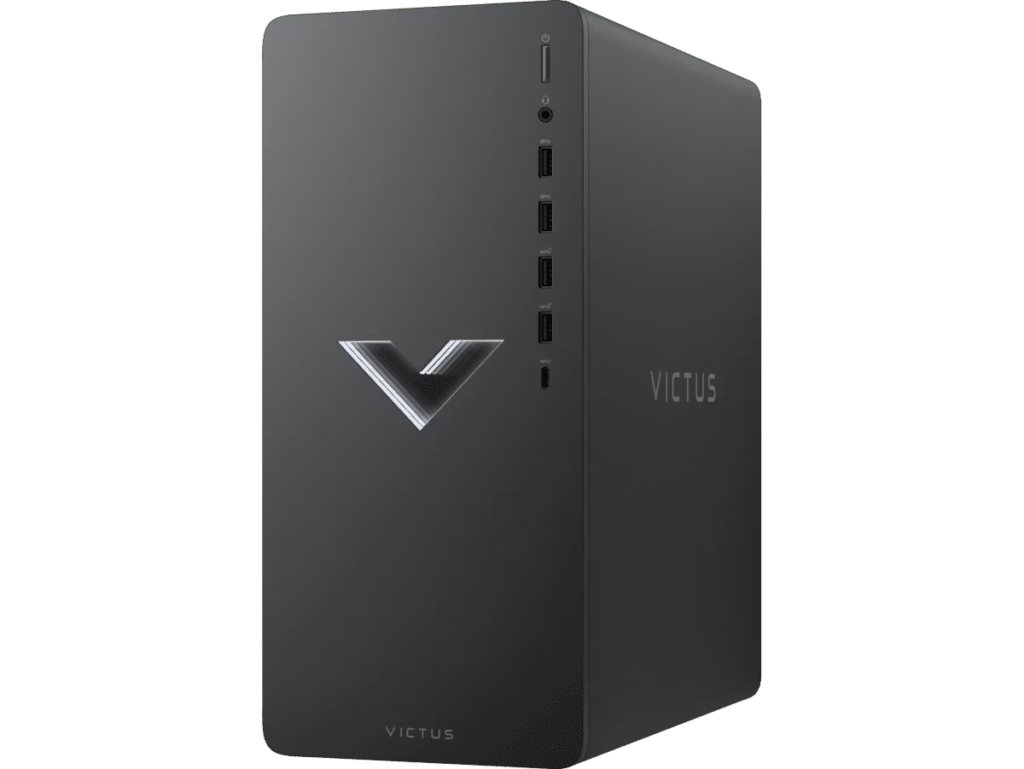
HP Victus 15L (2026 Refresh)

Photo Source: HP

The HP Victus 15L remains an excellent choice for gamers on a budget, now refreshed with current-generation components that deliver impressive 1080p performance without breaking the bank. This 2026 model addresses previous overheating concerns with improved thermal design while maintaining the compact footprint.

Key Specifications:

  • Processor: Intel Core i5-14400F or AMD Ryzen 5 7600X
  • RAM: 16GB DDR5-5600
  • Graphics: Nvidia GeForce RTX 4060 or AMD Radeon RX 7700 XT
  • Storage: 512GB PCIe 4.0 NVMe SSD
  • Price Range: $1,299 – $1,599 AUD

Performance: Exceptional 1080p gaming at high to ultra settings in all modern titles with consistent 100+ fps in competitive games. DLSS 3.5 and FSR 3 support enables pushing settings higher than raw hardware suggests. The RTX 4060 handles ray tracing reasonably well at 1080p with frame generation enabled.

PROS 

✅ Outstanding value for budget-conscious gamers 

✅ Excellent 1080p performance in all current games 

✅ Improved cooling over 2024 model prevents thermal throttling 

✅ Compact design ideal for smaller spaces 

✅ Easy upgrade path for RAM and storage 

✅ Plenty of accessible USB ports including USB-C

CONS 

❌ Limited to 1080p gaming—struggles with native 4K

 ❌ Single-channel RAM in base configuration (easily upgradable) 

❌ Build quality feels less premium than higher-end models 

❌ Basic motherboard limits future CPU upgrades

Mid-Range Gaming PC: Excellent 1440p Performance ($1,800 – $2,800 AUD)

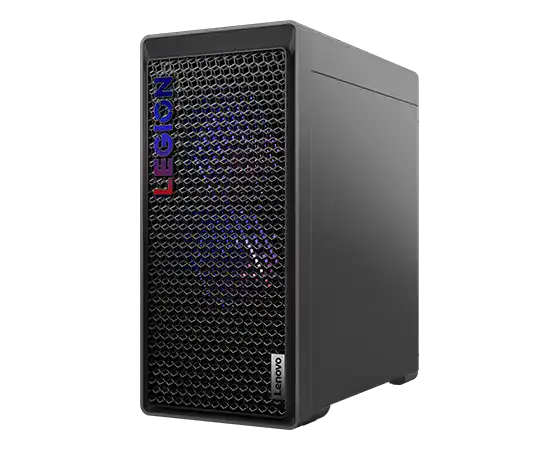
Lenovo Legion Tower 5i Gen 9

Photo Source:  Lenovo

The Legion Tower 5i has evolved significantly since 2024, now featuring 14th-gen Intel processors and RTX 4070 Super graphics delivering phenomenal 1440p gaming. This remains one of the best mid-range gaming PCs available in Australia, offering incredible performance-to-price ratio.

Key Specifications:

  • Processor: Intel Core i7-14700F (20 cores, 28 threads)
  • RAM: 32GB DDR5-5600 (dual-channel)
  • Graphics: Nvidia GeForce RTX 4070 Super (12GB VRAM)
  • Storage: 1TB PCIe 4.0 NVMe SSD
  • Cooling: Efficient tower cooling with excellent airflow
  • Price Range: $2,199 – $2,599 AUD

Performance: Dominates 1440p gaming with ultra settings maintaining 100+ fps in most titles. Capable 4K gaming at medium-high settings with DLSS upscaling. Ray tracing performs excellently at 1440p. Content creation and streaming handled effortlessly thanks to generous core count and RAM.

PROS CONS
Exceptional 1440p gaming performance

Competitive pricing for specifications offered

Excellent thermal management with quiet operation

✅ Tool-less side panel for easy upgrades

✅ RGB lighting is tasteful and customizable

✅ Strong multi-threaded performance for productivity tasks

✅ Generous warranty coverage from Lenovo

❌ Front I/O placement could be more convenient

❌ Proprietary motherboard limits some upgrade flexibility

❌ Power supply is adequate but not exceptional (650W)

❌ Could benefit from additional case fans for overclocking

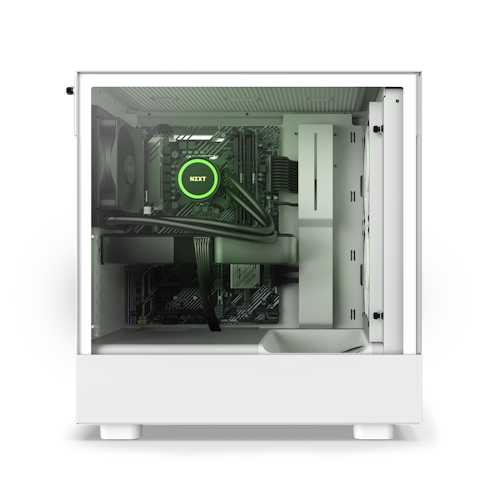
NZXT Player: Two Prime

Photo Source: NZXT

significantly improved component selection over the 2024 model. The Player: Two Prime targets enthusiasts who appreciate both aesthetics and performance.

Key Specifications:

  • Processor: Intel Core i5-14600K or AMD Ryzen 7 7800X3D
  • RAM: 32GB DDR5-6000 (dual-channel)
  • Graphics: Nvidia GeForce RTX 4070
  • Storage: 1TB PCIe 4.0 NVMe SSD
  • Cooling: NZXT Kraken 240mm AIO liquid cooler
  • Case: NZXT H6 Flow with excellent airflow
  • Price Range: $2,399 – $2,699 AUD

Performance: Stellar 1440p performance with the 7800X3D variant offering exceptional gaming-specific optimizations thanks to AMD’s 3D V-Cache technology. The RTX 4070 delivers smooth high-refresh gaming with excellent efficiency. Quiet operation even under sustained loads.

PROS CONS
✅ Premium build quality matching custom-built PCs

✅ Excellent cable management and aesthetics

✅ Built-in Wi-Fi 6E and Bluetooth 5.3

✅ AMD 7800X3D option offers best-in-class gaming performance

✅ Easy to upgrade with standard components

✅ NZXT CAM software for monitoring and RGB control

✅ Comprehensive 3-year warranty

❌ More expensive than comparable pre-builts

❌ Limited front panel USB ports

❌ 1TB storage may require expansion for large game libraries

❌ AIO cooler adds potential maintenance consideration

or fill in our online enquiry form today to set up an appointment with a local computer technician

High-Performance Gaming PC: Premium 4K Gaming ($2,800 – $4,500 AUD)

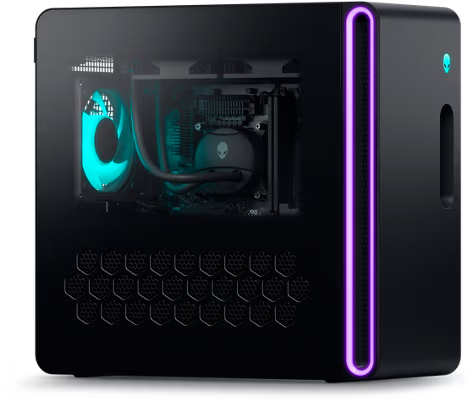
Alienware Aurora R16 (2026 Edition)

Photo Source: Dell

Dell’s Alienware Aurora R16 has matured into an exceptional high-performance gaming system with improved thermal design and more sensible component choices compared to previous generations. This 2026 refresh addresses earlier criticism while maintaining Alienware’s distinctive aesthetic.

Key Specifications:

  • Processor: Intel Core i7-14700KF or i9-14900KF
  • RAM: 32GB DDR5-5600 (upgradeable to 64GB)
  • Graphics: Nvidia GeForce RTX 4080 Super (16GB VRAM)
  • Storage: 2TB PCIe 4.0 NVMe SSD
  • Cooling: Redesigned internal airflow with improved fan curves
  • Power Supply: 1000W 80+ Gold
  • Price Range: $3,499 – $4,299 AUD

Performance: Native 4K gaming at high-ultra settings maintaining 60+ fps in demanding titles. With DLSS 3.5, achieves 100+ fps at 4K in most games. Ray tracing performance is outstanding. Future-proofed for upcoming demanding titles. Handles VR, content creation, and streaming effortlessly.

PROS CONS
✅ Significantly quieter than previous Aurora models

✅ Outstanding 4K gaming performance

✅ Beautiful, distinctive design with customizable RGB

✅ Excellent port selection including Thunderbolt 4

✅ Tool-less upgrade access for RAM, storage, and GPU

✅ Quality components throughout (improved from 2024)

✅ Strong resale value due to Alienware brand recognition

❌ Premium pricing compared to boutique builders

❌ Proprietary motherboard limits future upgrade paths

❌ Large footprint requires significant desk space

❌ Dell software bloatware (easily removable)

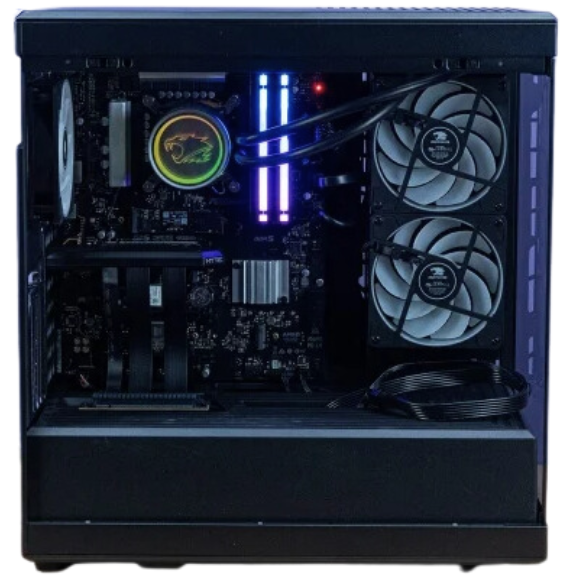
iBuyPower Gaming RDY SCALE 8 II

Photo Source: iBuyPower

Photo Source: iBuyPower

iBuyPower’s SCALE 8 II represents the evolution of their popular Y40 series, now featuring current-generation components in a refined chassis with excellent thermals. This system strikes an ideal balance between performance and value in the high-end segment.

Key Specifications:

  • Processor: Intel Core i7-14700KF
  • RAM: 32GB DDR5-6000 RGB
  • Graphics: Nvidia GeForce RTX 4080 (16GB VRAM)
  • Storage: 2TB PCIe 4.0 NVMe SSD + 2TB HDD
  • Cooling: 360mm AIO liquid cooling
  • Case: Lian Li O11 Dynamic EVO or similar with excellent airflow
  • Power Supply: 1000W 80+ Gold modular
  • Price Range: $3,699 – $4,199 AUD

Performance: Exceptional 4K gaming with high-ultra settings delivering smooth 60+ fps. Overclocking headroom thanks to robust cooling solution. Multiple display support for immersive racing and flight sim setups. Excellent content creation performance for video editing and 3D rendering.

PROS CONS
✅ Vertical GPU mount showcases graphics card beautifully

✅ Outstanding thermals from premium cooling solution

✅ Built-in Wi-Fi 6E and Bluetooth 5.3

✅ Generous storage configuration accommodates large game libraries

✅ High-quality modular power supply aids cable management

✅ RGB lighting is extensive but tasteful

✅ Better value than competitors with similar specifications

❌ Fans can become audible under maximum load

❌ Large case requires significant space

❌ Software for RGB control can be finicky

❌ Shipping to Australia may incur additional costs

Enthusiast/Extreme Gaming PC: Ultimate 4K and Beyond ($4,500+ AUD)

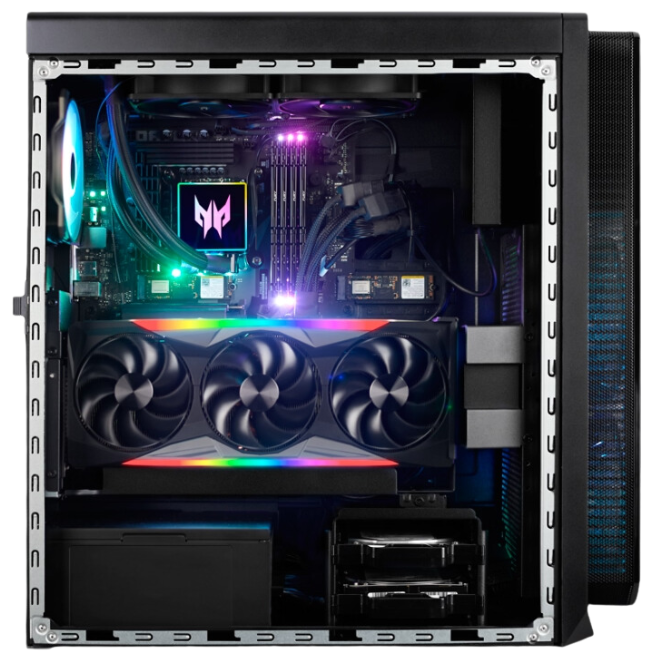
Acer Predator Orion 7000 (Gen 3)

Photo Source: Acer

The Predator Orion 7000 Gen 3 represents Acer’s flagship gaming desktop, now featuring bleeding-edge hardware including RTX 4090 graphics options and the latest high-core-count processors. This is luxury desktop gaming with both monstrous performance and striking design.

Key Specifications:

  • Processor: Intel Core i9-14900K or AMD Ryzen 9 7950X3D
  • RAM: 64GB DDR5-6400 RGB
  • Graphics: Nvidia GeForce RTX 4090 (24GB VRAM)
  • Storage: 2TB PCIe 5.0 NVMe SSD + 2TB PCIe 4.0 SSD
  • Cooling: Custom liquid cooling solution with RGB
  • Case: Predator Orion with extensive RGB and tempered glass
  • Power Supply: 1200W 80+ Platinum
  • Price Range: $5,999 – $7,499 AUD

Performance: Uncompromising 4K gaming at maximum settings with ray tracing fully enabled maintaining 100+ fps in most titles. Capable of 8K gaming in supported titles with DLSS. Future-proofed for next-generation gaming requirements. Professional-grade performance for 8K video editing, 3D rendering, and computational workloads.

PROS CONS
✅ Absolute beast of performance in every scenario

✅ Stunning ARGB lighting throughout with customization

✅ Extensive upgrade potential for future-proofing

✅ Best-in-class cooling maintains low temperatures

✅ Premium build quality throughout

✅ Comprehensive I/O including multiple USB-C and Thunderbolt

✅ Handles any game, any resolution, any setting

❌ Extremely expensive—requires significant budget

❌ Very noisy when cooling system ramps up under load

❌ Massive and heavy—requires dedicated space

❌ Power consumption is substantial (consider electricity costs)

❌ Overkill for most users and use cases

Corsair Vengeance i8200

Photo Source: Corsair

New to the 2026 market, Corsair’s Vengeance i8200 combines the company’s decades of component expertise into a complete system featuring premium Corsair parts throughout. This represents one of the highest-quality pre-built systems available.

Key Specifications:

  • Processor: Intel Core i9-14900KS (special edition binned chip)
  • RAM: 64GB DDR5-6400 Corsair Dominator Platinum RGB
  • Graphics: Nvidia GeForce RTX 4090 (24GB VRAM)
  • Storage: 2TB Corsair MP700 PCIe 5.0 SSD + 4TB PCIe 4.0 SSD
  • Cooling: Corsair iCUE H170i Elite 420mm AIO
  • Case: Corsair 7000D Airflow Full Tower
  • Power Supply: Corsair HX1500i 1500W 80+ Platinum
  • Price Range: $6,999 – $8,499 AUD

Performance: Represents the pinnacle of consumer gaming performance with the binned i9-14900KS achieving higher stable clock speeds than standard chips. RTX 4090 delivers unmatched 4K and 8K gaming. Professional workstation capabilities rival dedicated systems costing significantly more.

PROS CONS
✅ Premium Corsair components throughout ensure quality

✅ Unified iCUE software controls all RGB and monitoring

✅ Exceptional build quality and attention to detail

✅ Outstanding thermal performance from oversized cooling

✅ Whisper-quiet even under sustained maximum loads

✅ Extensive warranty and Corsair’s excellent support

✅ Stunning aesthetics with tempered glass panels

✅ Fully upgradeable with standard components

❌ Extremely expensive—one of the priciest pre-builts available

❌ Massive full-tower case requires significant space

❌ Overkill for pure gaming—better suited for professional work

❌ High power consumption impacts electricity bills

❌ RGB overload may not suit minimalist preferences

Compact Gaming PC: High Performance in Small Form Factor ($2,200 – $3,500 AUD)

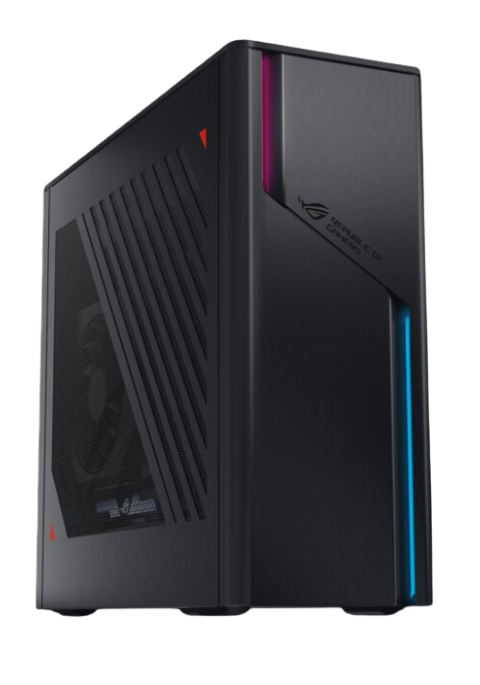
Asus ROG G22CH Huracan (2026)

Photo Source: Asus

The ROG G22CH Huracan continues Asus’s compact gaming legacy with significant improvements over the 2024 model. Enhanced cooling solves previous thermal concerns while maintaining the incredibly small footprint that makes this system ideal for space-constrained setups.

Key Specifications:

  • Processor: Intel Core i7-14700F or AMD Ryzen 7 7800X
  • RAM: 32GB DDR5-5600
  • Graphics: Nvidia GeForce RTX 4070 (custom compact design)
  • Storage: 1TB PCIe 4.0 NVMe SSD
  • Cooling: Redesigned airflow with larger fans and heat pipes
  • Volume: 14.7L (extremely compact)
  • Price Range: $2,399 – $2,899 AUD

Performance: Impressive 1440p gaming in such a small package maintaining high-ultra settings at 100+ fps in most titles. Adequate 4K gaming at medium-high settings with upscaling. Thermals remain in check thanks to redesigned cooling unlike the 2024 model. Surprising quiet operation given the compact dimensions.

PROS CONS
Incredibly compact design ideal for small spaces

✅Accessible price point for the form factor

✅Excellent 1440p gaming performance

✅Improved cooling prevents thermal throttling

✅Stylish ROG design with tasteful RGB

✅Wi-Fi 6E and Bluetooth built-in

✅Can fit in entertainment centers unlike traditional towers

Extremely limited upgrade potential due to custom components

❌ Proprietary parts make repairs more expensive

❌ Small PSU limits GPU upgrade options

❌ Can still become warm during extended gaming sessions

❌ Limited I/O compared to full-size systems

Cooler Master NR200P MAX Custom Build

Photo Source: Cooler Master

While technically requiring assembly, boutique builders in Australia are offering the NR200P MAX as a complete system showcasing that small form factor doesn’t mean compromised performance. This represents the pinnacle of SFF gaming in 2026.

Key Specifications:

  • Processor: Intel Core i7-14700K or AMD Ryzen 7 7800X3D
  • RAM: 32GB DDR5-6000
  • Graphics: Nvidia GeForce RTX 4070 Ti Super (SFF design)
  • Storage: 2TB PCIe 4.0 NVMe SSD
  • Cooling: Integrated 280mm AIO cooler
  • Volume: 18.25L
  • Price Range: $3,199 – $3,699 AUD (from boutique builders)

Performance: Rivals full-size systems despite compact dimensions with excellent 1440p and capable 4K gaming. The 7800X3D option provides best-in-class gaming performance in minimal space. Thermals are excellent thanks to integrated premium cooling solution.

PROS 

  • Premium SFF performance matching larger systems
  • Included 280mm AIO provides excellent cooling
  • Standard components enable future upgrades (within limits)
  • Beautiful design with tempered glass side panel
  • Reasonably portable at under 20L volume
  • Quality throughout with no compromises
  • Boutique builder support for Australian customers

CONS 

  • More expensive than equivalent full-size systems 
  • Still limited upgrade potential due to space constraints 
  • Assembly required or premium for builder assembly 
  • Can be challenging to work in for novices 
  • GPU length restrictions limit some options

Key Gaming PC Components Explained (2026 Edition)

Processors (CPUs)

Intel 14th and 15th Gen: Intel’s latest processors offer exceptional single-threaded performance crucial for gaming alongside improved multi-threaded capabilities for productivity. Core i5 handles gaming excellently, i7 offers best gaming-to-productivity balance, and i9 provides maximum performance for professionals and enthusiasts.

AMD Ryzen 7000 and 8000 Series: AMD’s current processors deliver outstanding value and efficiency. The 7800X3D remains the gaming king thanks to 3D V-Cache technology. Ryzen 9 processors excel at mixed workloads combining gaming with content creation.

What You Need: i5 or Ryzen 5 for 1080p gaming, i7 or Ryzen 7 for 1440p-4K gaming, and i9 or Ryzen 9 only if serious content creation accompanies gaming.

Graphics Cards (GPUs)

Nvidia RTX 50-Series (if released by mid-2026): Next-generation architecture promising significant ray tracing and AI upscaling improvements. RTX 4060 handles 1080p excellently, RTX 4070 dominates 1440p, RTX 4080 conquers 4K, and RTX 4090 enables 8K gaming.

AMD Radeon RX 8000-Series: Competitive alternatives often offering better value at mid-range price points with excellent raw performance. FSR 4 technology rivals DLSS for upscaling quality.

VRAM Requirements: 8GB minimum for 1080p, 12GB recommended for 1440p, 16GB+ for 4K gaming, and 24GB for 8K or professional applications.

Memory (RAM)

DDR5 Standard: DDR5 is now mainstream offering significantly improved bandwidth over DDR4. 16GB minimum for gaming (32GB recommended), 32GB ideal for 1440p-4K gaming and multitasking, and 64GB for professional workloads, heavy multitasking, or future-proofing.

Speed Matters: DDR5-5600 baseline, DDR5-6000 sweet spot for performance/price, and DDR5-6400+ for enthusiasts wanting maximum performance.

Storage

PCIe 5.0 NVMe SSDs: Cutting-edge storage offering 14,000+ MB/s reads enabling DirectStorage technology for near-instant game loading. Currently expensive with limited practical gaming advantage over PCIe 4.0.

PCIe 4.0 NVMe SSDs: Current sweet spot with 7,000+ MB/s reads providing excellent performance at reasonable prices. 1TB minimum recommended, 2TB ideal for large game libraries.

Traditional HDDs: Still viable for mass storage of less-frequently played games or media at $20-$30 per TB. Not suitable for primary game installation.

Power Supplies

Wattage Requirements: Budget systems (RTX 4060): 550-650W, mid-range (RTX 4070): 650-750W, high-end (RTX 4080): 850-1000W, and extreme (RTX 4090): 1000-1200W+.

Efficiency Ratings: 80+ Bronze acceptable for budget builds, 80+ Gold recommended for most systems, and 80+ Platinum/Titanium for high-end systems reducing electricity costs long-term.

or fill in our online enquiry form today to set up an appointment with a local computer technician

Gaming PC vs. Console Gaming in 2026

Why Choose PC Gaming?

Superior Performance: Even mid-range gaming PCs exceed PS5 Pro and Xbox Series X performance with higher frame rates, better graphics quality, and support for high-refresh displays beyond 120Hz.

Upgradeability: Replace individual components extending system life indefinitely unlike consoles requiring complete replacement every generation.

Game Library: Access to decades of PC games, extensive mod communities, and games unavailable on consoles including strategy, simulation, and indie titles.

Multitasking: Gaming PCs serve as productivity machines, content creation workstations, and entertainment centers—not just gaming devices.

Free Online Play: No subscription fees required for online multiplayer unlike PlayStation Plus or Xbox Game Pass Core.

Better Sales and Pricing: Steam sales, Epic giveaways, Humble Bundle, and competitive digital storefronts offer games at significantly lower prices than console digital stores.

When Consoles Make More Sense

Lower Entry Cost: PS5 and Xbox Series X/S cost $600-$800 AUD significantly less than gaming PCs offering comparable experiences.

Simplicity: Plug-and-play convenience without driver updates, component compatibility concerns, or technical troubleshooting.

Exclusive Games: Console-exclusive titles like PlayStation’s first-party games (though many now come to PC eventually).

Couch Gaming: Optimized for living room entertainment and local multiplayer gaming experiences.

Building vs. Buying Pre-Built Gaming PCs in 2026

Advantages of Building Your Own

Cost Savings: Building yourself saves 10-25% compared to equivalent pre-built systems with the gap widening for higher-end configurations.

Component Choice: Select exactly the parts you want including specific brands, aesthetics, and features matching your preferences perfectly.

Learning Experience: Understanding your system’s internals aids troubleshooting and future upgrades while developing valuable technical knowledge.

Warranty Control: Individual component warranties (often 2-5 years) versus single pre-built warranty.

Advantages of Pre-Built Systems

Time Savings: No research, ordering from multiple retailers, assembly, cable management, OS installation, or troubleshooting required.

Warranty Simplicity: Single point of contact for all hardware issues rather than diagnosing which component failed and dealing with that manufacturer.

Professional Assembly: Expert cable management, proper thermal paste application, and tested stability before shipping.

Immediate Use: Arrives ready to game out of the box—just connect and update.

Better for Novices: No technical knowledge required eliminating intimidation factor and risk of assembly mistakes.

The Verdict in 2026

Build If: You enjoy the process, want maximum value, have time for research and assembly, and feel comfortable troubleshooting.

Buy Pre-Built If: You value time over money, want warranty simplicity, lack confidence in assembly, or need immediate gaming without delays.

The gap has narrowed considerably with pre-built pricing becoming more competitive and quality improving significantly. Many Australian boutique builders offer excellent value with custom configurations rivaling DIY savings.

Common Gaming PC Buying Mistakes to Avoid

Bottlenecking: Pairing RTX 4090 with i5 processor or RTX 4060 with i9 wastes money on mismatched components. Balance CPU and GPU appropriately for your resolution and use case.

Insufficient Power Supply: Undersized PSUs cause stability issues, prevent GPU boosting, and limit upgrade options requiring eventual replacement anyway.

Ignoring Thermals: Cheap cooling solutions cause thermal throttling negating performance advantages of premium components purchased.

Single-Channel RAM: Installing single RAM stick rather than dual-channel configuration significantly reduces performance especially with Ryzen processors.

Inadequate Storage: 512GB fills quickly with modern game sizes (100GB+ for AAA titles). Starting with 1TB minimum prevents immediate storage shortage.

Cheap Peripherals: Investing thousands in PC then using cheap keyboard, mouse, and monitor wastes the system’s potential. Budget 15-20% of total for quality peripherals and display.

Ignoring Monitor Specs: Buying 60Hz monitor with RTX 4080 wastes GPU capability. Match monitor refresh rate to GPU performance tier (144Hz+ for high-end GPUs).

Not Reading Reviews: Marketing specifications don’t reveal thermal problems, noisy fans, build quality issues, or reliability concerns discovered by reviewers and users.

Forgetting Windows License: Budget systems may not include Windows 11 ($100-$200 AUD additional cost if not included).

Gaming PC Maintenance Tips for Australian Conditions

Regular Cleaning Schedule

Every 3 Months: Compressed air cleaning of exterior vents and fan grilles takes 5 minutes preventing dust infiltration.

Every 6-12 Months: Open case and clean internal components thoroughly removing dust from GPU fans, CPU cooler, case fans, and motherboard using compressed air or electric duster.

Annual Deep Clean: Remove components if necessary for thorough cleaning, check thermal paste condition, and inspect for any wear or damage.

Melbourne Summer Survival

Room Temperature: Game in air-conditioned spaces when possible. Ambient temperatures above 30°C significantly impact component temperatures.

Fan Curves: Adjust fan curves more aggressively during summer months prioritizing cooling over quiet operation.

Monitor Temperatures: Use HWMonitor or similar tools tracking component temperatures. CPUs should stay below 85°C, GPUs below 80°C ideally.

Take Breaks: During extreme heat waves, take regular gaming breaks allowing components to cool reducing stress on cooling systems.

Software Maintenance

Windows Updates: Keep Windows 11 updated for security patches and performance improvements.

Driver Updates: Update GPU drivers regularly (monthly) for game optimizations and performance improvements.

Remove Bloatware: Uninstall unnecessary software reducing background processes consuming resources and generating heat.

Antivirus Protection: Use Windows Defender (built-in and effective) or reputable third-party antivirus preventing malware causing excessive CPU usage.

Conclusion

The gaming PC landscape in 2026 offers unprecedented choice across every budget and performance tier. Whether you’re a first-time builder seeking solid 1080p gaming, a competitive player demanding 1440p high-refresh experiences, or an enthusiast chasing 4K glory, there’s never been a better time to join or upgrade your PC gaming setup.

Remember that the “best” gaming PC is the one matching your specific needs, budget, and use cases—not necessarily the most expensive or powerful system available. Consider your target resolution (1080p, 1440p, or 4K), the games you play (esports versus AAA single-player), secondary uses (streaming, content creation), and realistic budget including peripherals and monitor when making your decision.

The Australian gaming PC market in 2026 is competitive and mature with local retailers, strong consumer protections, and improving availability. Whether building yourself or buying pre-built, you’re entering the best era of PC gaming with incredible performance, value, and choice available to gamers at every level.

Need Help With Your Gaming PC?

If your gaming PC is experiencing performance issues, overheating, or you need professional assistance with upgrades or maintenance, Computer Cures provides expert gaming PC services throughout Melbourne. Our technicians understand gaming hardware intimately and can diagnose problems, recommend cost-effective upgrades, perform professional cleaning and thermal paste replacement, or help you get the most from your gaming investment.

Contact us today for gaming PC troubleshooting, upgrades, or maintenance ensuring your system performs at its peak for years to come. Don’t let technical issues keep you from enjoying the incredible gaming experiences modern PCs deliver.

or fill in our online enquiry form today to set up an appointment with a local computer technician